

产品中心
Java IO(Input/Output)是Java语言中用于处理输入输出操作的核心API。它提供了丰富的类和接口,用于读写文件、网络通信、内存数据传输等各种IO操作。本文将深入介绍Java IO体系,包括传统IO和NIO(New IO),并通过详细的示例代码展示各种IO类的使用方法和最佳实践。
本文适合对Java编程有基础了解,想要深入学习Java IO操作的开发者阅读。通过本文的学习,您将掌握Java IO的核心概念、各种IO类的使用方法以及性能优化技巧。
Java IO体系主要分为传统IO(也称为OIO - Old IO)和NIO(New IO)两大类。传统IO基于流(Stream)模型,而NIO基于通道(Channel)和缓冲区(Buffer)模型。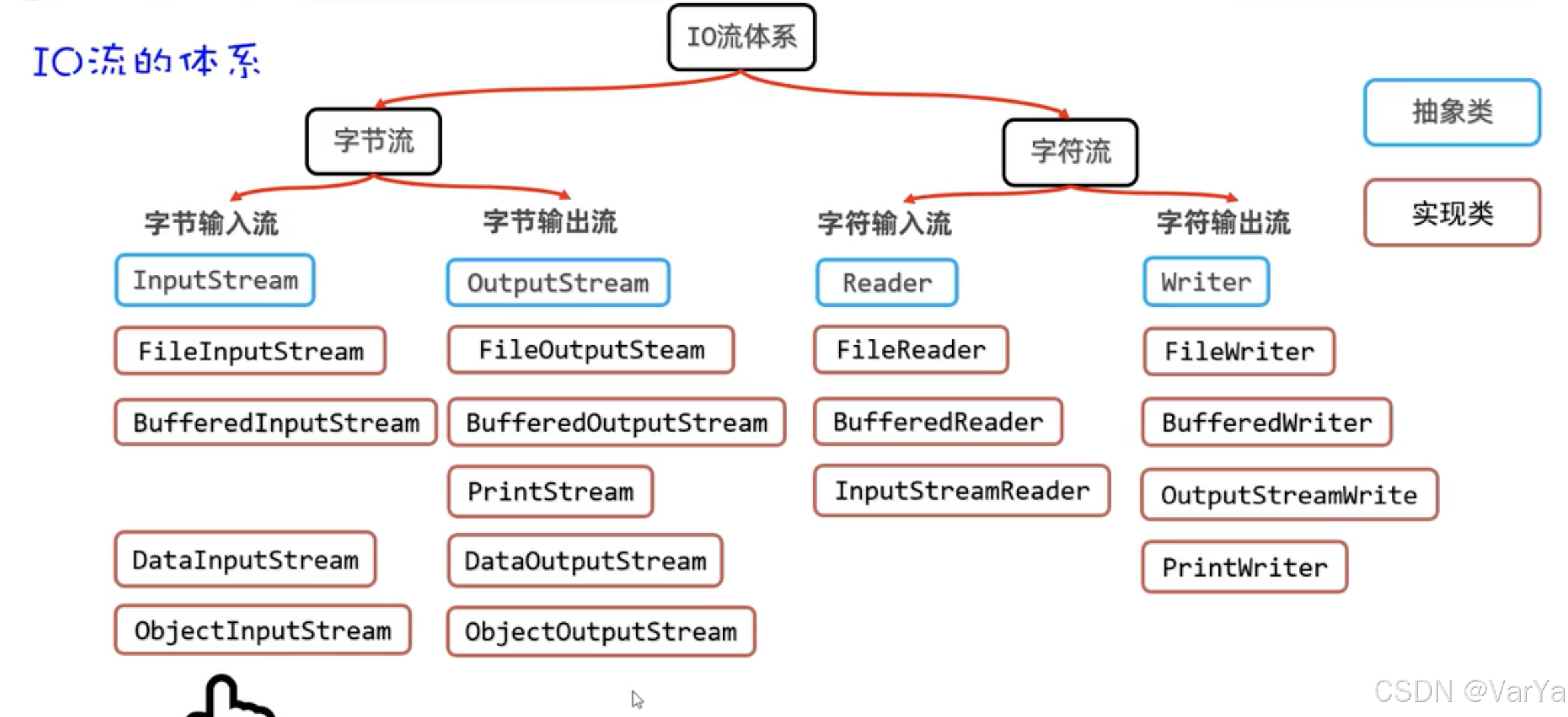
传统IO主要包括以下几类:
字节流:处理字节数据,以InputStream和OutputStream为基类
字符流:处理字符数据,以Reader和Writer为基类
转换流:连接字节流和字符流,如InputStreamReader和OutputStreamWriter
缓冲流:提供缓冲功能,如BufferedReader和BufferedWriter
对象流:处理对象的序列化和反序列化,如ObjectInputStream和ObjectOutputStream
随机访问流:允许随机访问文件,如RandomAccessFile
以下是Java IO流体系的完整层次结构,完全按照图片内容呈现:
                                         IO流体系
                                              │
                   ┌──────────────────────────┴───────────────────────────┐
                   │                                                      │
                字节流                                                    字符流
                   │                                                      │
    ┌──────────────┴──────────────┐                        ┌───────────────┴───────────────┐
    │                             │                        │                               │
  字节输入流                      字节输出流               字符输入流                       字符输出流
    │                             │                        │                               │
┌───▼──────────┐          ┌──────────▼──────┐       ┌─────▼───────────┐           ┌─────────▼───────┐
│  InputStream │          │  OutputStream   │       │     Reader      │           │      Writer     │
│   (抽象类)   │          │    (抽象类)     │       │    (抽象类)     │           │     (抽象类)    │
└─────┬────────┘          └────────┬────────┘       └─────┬───────────┘           └─────────┬───────┘
      │                            │                      │                                   │
┌─────▼────────┐     ┌─────────────▼────────┐     ┌───────▼───────────┐           ┌─────────▼───────┐
│FileInputStream│     │FileOutputStream     │     │FileReader         │           │FileWriter       │
│(实现类)       │     │(实现类)              │     │(实现类)           │           │(实现类)         │
├───────────────┤     ├─────────────────────┤     ├───────────────────┤           ├─────────────────┤
│BufferedInputStream│ │BufferedOutputStream │     │BufferedReader     │           │BufferedWriter   │
│(实现类)           │ │(实现类)              │     │(实现类)           │           │(实现类)         │
├───────────────┤     ├─────────────────────┤     ├───────────────────┤           ├─────────────────┤
│DataInputStream│     │PrintStream          │     │InputStreamReader  │           │OutputStreamWriter│
│(实现类)       │     │(实现类)              │     │(实现类)           │           │(实现类)         │
├───────────────┤     ├─────────────────────┤     └───────────────────┘           ├─────────────────┤
│ObjectInputStream│   │DataOutputStream     │                                      │PrintWriter      │
│(实现类)         │   │(实现类)              │                                      │(实现类)         │
└───────────────┘     ├─────────────────────┤                                      └─────────────────┘
                      │ObjectOutputStream   │
                      │(实现类)              │
                      └─────────────────────┘
图例说明:
蓝色框:抽象类(如InputStream、OutputStream、Reader、Writer)
红色框:实现类(如FileInputStream、BufferedReader等)
IO流体系说明:
顶层分类:IO流分为字节流和字符流两大类
抽象基类:
字节流的抽象基类:InputStream(输入)、OutputStream(输出)
字符流的抽象基类:Reader(输入)、Writer(输出)
主要实现类:
字节输入流实现类:
FileInputStream:从文件读取字节
BufferedInputStream:带缓冲的字节输入流
DataInputStream:读取基本数据类型
ObjectInputStream:反序列化对象
字节输出流实现类:
FileOutputStream:向文件写入字节
BufferedOutputStream:带缓冲的字节输出流
PrintStream:格式化输出
DataOutputStream:写入基本数据类型
ObjectOutputStream:序列化对象
字符输入流实现类:
FileReader:从文件读取字符
BufferedReader:带缓冲的字符输入流,支持按行读取
InputStreamReader:字节流到字符流的转换
字符输出流实现类:
FileWriter:向文件写入字符
BufferedWriter:带缓冲的字符输出流
OutputStreamWriter:字符流到字节流的转换
PrintWriter:格式化字符输出
转换流:InputStreamReader和OutputStreamWriter用于在字节流和字符流之间进行转换,处理字符编码问题。
| 特性 | 传统IO (Stream) | NIO (Channel/Buffer) |
|---|---|---|
| 模型 | 流模型,单向传输 | 通道模型,双向传输 |
| 阻塞 | 同步阻塞IO | 支持非阻塞IO |
| 数据传输 | 直接读写数据 | 通过Buffer缓冲区操作数据 |
| 多路复用 | 不支持 | 支持,通过Selector |
| 适用场景 | 简单IO操作,低并发 | 高并发网络应用,大文件传输 |
| 性能 | 低并发场景下使用简单,但性能有限 | 高并发场景下性能更好 |
字节流用于处理原始字节数据,如图片、音频、视频等二进制文件。字节流的基类是InputStream(输入)和OutputStream(输出)。
FileInputStream用于从文件中读取字节数据。
// 文件输入流基本使用
public static void fileInputStreamExample() throws IOException {
    try (FileInputStream fis = new FileInputStream("example.txt")) {
        int data;
        while ((data = fis.read()) != -1) {
            System.out.print((char) data);
        }
    }
}
ByteArrayInputStream用于从字节数组中读取数据。
// 字节数组输入流示例
public static void byteArrayInputStreamExample() {
    byte[] byteArray = {65, 66, 67, 68, 69}; // ASCII码,对应A-Z
    try (ByteArrayInputStream bais = new ByteArrayInputStream(byteArray)) {
        int data;
        while ((data = bais.read()) != -1) {
            System.out.print((char) data);
        }
    }
}
| 输入流类型 | 读取方式 | 适用场景 | 性能特点 |
|---|---|---|---|
| FileInputStream | 单字节读取 | 小文件读取 | 简单但效率低 |
| FileInputStream | 缓冲区读取 | 大文件读取 | 效率较高 |
| ByteArrayInputStream | 内存读取 | 内存中数据处理 | 速度最快 |
FileOutputStream用于将字节数据写入文件。
// 文件输出流基本使用
public static void fileOutputStreamExample() throws IOException {
    String content = "Hello, FileOutputStream!";
    try (FileOutputStream fos = new FileOutputStream("output.txt")) {
        fos.write(content.getBytes());
        System.out.println("数据已写入文件");
    }
}
ByteArrayOutputStream用于将数据写入字节数组缓冲区。
// 字节数组输出流示例
public static void byteArrayOutputStreamExample() throws IOException {
    try (ByteArrayOutputStream baos = new ByteArrayOutputStream()) {
        String content = "Hello, ByteArrayOutputStream!";
        baos.write(content.getBytes());

        // 获取写入的字节数组
        byte[] byteArray = baos.toByteArray();
        System.out.println("写入的字节数: " + byteArray.length);
        System.out.println("内容: " + new String(byteArray));
    }
}
| 输出流类型 | 写入方式 | 适用场景 | 性能特点 |
|---|---|---|---|
| FileOutputStream | 单字节写入 | 小数据写入 | 简单但效率低 |
| FileOutputStream | 缓冲区写入 | 大数据写入 | 效率较高 |
| ByteArrayOutputStream | 内存写入 | 需要在内存中构建数据 | 速度最快 |
字符流用于处理字符数据,如文本文件。字符流会自动处理字符编码问题,比字节流更适合文本操作。字符流的基类是Reader(输入)和Writer(输出)。
FileReader用于从文件中读取字符数据。
// 文件字符输入流示例
public static void fileReaderExample() throws IOException {
    try (FileReader fr = new FileReader("text.txt")) {
        int data;
        while ((data = fr.read()) != -1) {
            System.out.print((char) data);
        }
    }
}
BufferedReader提供缓冲功能,可以按行读取文本,提高读取效率。
// 缓冲字符输入流示例
public static void bufferedReaderExample() throws IOException {
    try (BufferedReader br = new BufferedReader(new FileReader("text.txt"))) {
        String line;
        while ((line = br.readLine()) != null) {
            System.out.println(line);
        }
    }
}
| 输入流类型 | 读取方式 | 适用场景 | 性能特点 |
|---|---|---|---|
| FileReader | 单字符读取 | 小文本文件 | 简单但效率低 |
| BufferedReader | 按行读取 | 文本文件处理 | 效率高,使用方便 |
FileWriter用于将字符数据写入文件。
// 文件字符输出流示例
public static void fileWriterExample() throws IOException {
    String content = "Hello, FileWriter!\n这是中文内容。";
    try (FileWriter fw = new FileWriter("output.txt")) {
        fw.write(content);
        System.out.println("文本已写入文件");
    }
}
BufferedWriter提供缓冲功能,支持按行写入,提高写入效率。
// 缓冲字符输出流示例
public static void bufferedWriterExample() throws IOException {
    try (BufferedWriter bw = new BufferedWriter(new FileWriter("output.txt"))) {
        bw.write("Hello, BufferedWriter!");
        bw.newLine(); // 写入换行符
        bw.write("这是第二行内容。");
        System.out.println("文本已写入文件");
    }
}
| 输出流类型 | 写入方式 | 适用场景 | 性能特点 |
|---|---|---|---|
| FileWriter | 直接写入 | 小文本写入 | 简单但效率低 |
| BufferedWriter | 缓冲写入 | 大文本写入 | 效率高,支持newLine() |
转换流用于在字节流和字符流之间进行转换。Java提供了两个转换流:InputStreamReader和OutputStreamWriter。
InputStreamReader将字节输入流转换为字符输入流,可以指定字符编码。
// 输入转换流示例
public static void inputStreamReaderExample() throws IOException {
    try (FileInputStream fis = new FileInputStream("utf8.txt");
         InputStreamReader isr = new InputStreamReader(fis, StandardCharsets.UTF_8);
         BufferedReader br = new BufferedReader(isr)) {

        String line;
        while ((line = br.readLine()) != null) {
            System.out.println(line);
        }
    }
}
OutputStreamWriter将字符输出流转换为字节输出流,可以指定字符编码。
// 输出转换流示例
public static void outputStreamWriterExample() throws IOException {
    try (FileOutputStream fos = new FileOutputStream("utf8_output.txt");
         OutputStreamWriter osw = new OutputStreamWriter(fos, StandardCharsets.UTF_8);
         BufferedWriter bw = new BufferedWriter(osw)) {

        bw.write("Hello, OutputStreamWriter!\n这是UTF-8编码的中文内容。");
        System.out.println("内容已写入文件,编码为UTF-8");
    }
}
转换流最重要的功能之一是处理不同的字符编码。
// 不同编码处理示例
public static void encodingHandlingExample() throws IOException {
    // 使用GBK编码写入文件
    try (OutputStreamWriter osw = new OutputStreamWriter(
            new FileOutputStream("gbk_file.txt"), "GBK")) {
        osw.write("这是GBK编码的文件内容");
    }

    // 使用正确的编码读取文件
    try (InputStreamReader isr = new InputStreamReader(
            new FileInputStream("gbk_file.txt"), "GBK")) {
        int data;
        StringBuilder content = new StringBuilder();
        while ((data = isr.read()) != -1) {
            content.append((char) data);
        }
        System.out.println("使用GBK编码读取: " + content.toString());
    }

    // 使用错误的编码读取文件(会出现乱码)
    try (InputStreamReader isr = new InputStreamReader(
            new FileInputStream("gbk_file.txt"), "UTF-8")) {
        int data;
        StringBuilder content = new StringBuilder();
        while ((data = isr.read()) != -1) {
            content.append((char) data);
        }
        System.out.println("使用UTF-8编码读取: " + content.toString());
    }
}
| 字符 | ASCII | UTF-8 | GBK |
|---|---|---|---|
| 英文字母 'A' | 1字节 | 1字节 | 1字节 |
| 数字 '1' | 1字节 | 1字节 | 1字节 |
| 中文 '中' | 不支持 | 3字节 | 2字节 |
| 日文 '日' | 不支持 | 3字节 | 2字节 |
缓冲流为其他流提供缓冲功能,通过减少磁盘访问次数来提高IO性能。Java提供了字节缓冲流和字符缓冲流。
BufferedInputStream为字节输入流提供缓冲功能。
// 字节缓冲输入流示例
public static void bufferedInputStreamExample() throws IOException {
    try (BufferedInputStream bis = new BufferedInputStream(new FileInputStream("large_file.dat"))) {
        byte[] buffer = new byte[8192];
        int bytesRead;
        while ((bytesRead = bis.read(buffer)) != -1) {
            // 处理读取的数据
            processData(buffer, bytesRead);
        }
    }
}
BufferedOutputStream为字节输出流提供缓冲功能。
// 字节缓冲输出流示例
public static void bufferedOutputStreamExample() throws IOException {
    try (BufferedOutputStream bos = new BufferedOutputStream(new FileOutputStream("output.dat"))) {
        byte[] data = new byte[10000];
        // 填充数据...
        bos.write(data);
        bos.flush(); // 确保数据被写入
    }
}
BufferedReader提供按行读取功能,效率更高。
// 字符缓冲输入流示例
public static void bufferedReaderAdvancedExample() throws IOException {
    try (BufferedReader br = new BufferedReader(new FileReader("text.txt"))) {
        // 按行读取
        String line;
        while ((line = br.readLine()) != null) {
            System.out.println("读取到一行: " + line);
        }
    }
}
BufferedWriter提供缓冲写入功能,支持newLine()方法。
// 字符缓冲输出流示例
public static void bufferedWriterAdvancedExample() throws IOException {
    try (BufferedWriter bw = new BufferedWriter(new FileWriter("output.txt"))) {
        bw.write("第一行内容");
        bw.newLine(); // 平台无关的换行符
        bw.write("第二行内容");
        bw.newLine();
        bw.write("第三行内容");
    } // 自动关闭时会自动flush
}
不同缓冲区大小对性能的影响:
| 缓冲区大小 | 小文件(1MB)读取时间 | 大文件(100MB)读取时间 | 特点 |
|---|---|---|---|
| 无缓冲(直接流) | 较慢 | 最慢 | 简单但效率低 |
| 4KB | 较快 | 较快 | 平衡的选择 |
| 8KB | 快 | 快 | 默认大小,通常最优 |
| 16KB | 相似 | 相似 | 对某些场景稍好 |
| 128KB+ | 相似 | 变化不大 | 内存占用增加 |
对象流用于对象的序列化和反序列化,允许将Java对象写入文件或通过网络传输,然后在需要时恢复对象。
对象序列化是将对象转换为字节序列的过程。要序列化的类必须实现Serializable接口。
// 可序列化类示例
static class Person implements Serializable {
    private static final long serialVersionUID = 1L;
    private String name;
    private int age;
    private transient String password; // transient字段不会被序列化

    // 构造方法、getter和setter
}

// 对象序列化示例
public static void objectSerializationExample() throws IOException {
    Person person = new Person("张三", 25, "secret123");

    try (ObjectOutputStream oos = new ObjectOutputStream(
            new FileOutputStream("person.ser"))) {
        oos.writeObject(person);
        System.out.println("对象已序列化");
    }
}
对象反序列化是将字节序列恢复为对象的过程。
// 对象反序列化示例
public static void objectDeserializationExample() throws IOException, ClassNotFoundException {
    try (ObjectInputStream ois = new ObjectInputStream(
            new FileInputStream("person.ser"))) {
        Person deserializedPerson = (Person) ois.readObject();
        System.out.println("反序列化的对象: " + deserializedPerson);
        // 注意:password字段为null,因为它被标记为transient
    }
}
serialVersionUID:显式声明序列化版本ID,确保版本兼容性
transient字段:不会被序列化,适用于敏感信息
静态字段:不会被序列化,因为序列化是针对对象实例的
循环引用:Java序列化机制能够正确处理对象图中的循环引用
版本兼容性:修改类结构时,需要考虑对序列化的影响
RandomAccessFile提供了对文件的随机访问能力,可以在文件的任意位置进行读写操作。它既可以作为输入流,也可以作为输出流。
// 随机访问流基本使用
public static void randomAccessFileBasicExample() throws IOException {
    try (RandomAccessFile raf = new RandomAccessFile("random_file.txt", "rw")) {
        // 写入数据
        raf.writeBytes("Hello, RandomAccessFile!");

        // 获取文件长度
        long length = raf.length();
        System.out.println("文件长度: " + length + " 字节");

        // 移动到文件开头
        raf.seek(7);

        // 读取指定位置的数据
        String content = raf.readLine();
        System.out.println("从位置7读取: " + content);

        // 在指定位置写入数据
        raf.seek(0);
        raf.writeBytes("Hi!");
    }
}
RandomAccessFile特别适合处理固定长度的记录文件。
// 记录类定义
static class Record {
    private static final int NAME_SIZE = 20;
    private static final int AGE_SIZE = 4;
    private static final int RECORD_SIZE = NAME_SIZE + AGE_SIZE;

    private String name;
    private int age;

    // 读取和写入方法
}

// 记录文件操作示例
public static void recordFileOperations() throws IOException {
    try (RandomAccessFile raf = new RandomAccessFile("records.dat", "rw")) {
        // 写入记录
        new Record("张三", 25).write(raf);
        new Record("李四", 30).write(raf);

        // 随机读取第二条记录
        raf.seek(1 * Record.RECORD_SIZE);
        Record record = Record.read(raf);
        System.out.println("读取的记录: " + record);

        // 更新第一条记录
        raf.seek(0);
        new Record("王五", 35).write(raf);
    }
}
// 大文件分块读写示例
public static void largeFileChunkOperations() throws IOException {
    int blockSize = 1024 * 1024; // 1MB块
    byte[] buffer = new byte[blockSize];

    try (RandomAccessFile raf = new RandomAccessFile("large.dat", "rw")) {
        // 分块写入
        for (int i = 0; i < 10; i++) { // 写入10个块
            long position = (long) i * blockSize;
            raf.seek(position);
            // 填充数据...
            raf.write(buffer);
        }

        // 随机读取某个块
        int blockToRead = 5;
        raf.seek((long) blockToRead * blockSize);
        raf.read(buffer);
        // 处理数据...
    }
}
NIO(New IO)是Java 1.4引入的新IO API,提供了非阻塞IO操作能力,主要用于高并发网络应用。NIO的核心组件包括:Buffer(缓冲区)、Channel(通道)和Selector(选择器)。
Buffer是NIO中用于存储数据的容器,所有NIO操作都通过Buffer进行。
// Buffer基本操作
public static void bufferBasicOperations() {
    // 分配缓冲区
    ByteBuffer buffer = ByteBuffer.allocate(1024);

    // 写入数据
    buffer.put((byte) 'H').put((byte) 'e').put((byte) 'l');

    // 准备读取(翻转)
    buffer.flip();

    // 读取数据
    while (buffer.hasRemaining()) {
        System.out.print((char) buffer.get());
    }

    // 清空缓冲区
    buffer.clear();
}
Channel是数据传输的通道,可以双向传输数据。常用的Channel包括:FileChannel、SocketChannel、ServerSocketChannel和DatagramChannel。
// FileChannel示例
public static void fileChannelExample() throws IOException {
    try (FileChannel channel = FileChannel.open(
            Paths.get("nio_file.txt"),
            StandardOpenOption.CREATE,
            StandardOpenOption.WRITE)) {

        String content = "Hello, FileChannel!";
        ByteBuffer buffer = ByteBuffer.wrap(content.getBytes());
        channel.write(buffer);
    }

    // 读取文件
    try (FileChannel channel = FileChannel.open(
            Paths.get("nio_file.txt"),
            StandardOpenOption.READ)) {

        ByteBuffer buffer = ByteBuffer.allocate(1024);
        channel.read(buffer);
        buffer.flip();

        String content = StandardCharsets.UTF_8.decode(buffer).toString();
        System.out.println("读取的内容: " + content);
    }
}
FileChannel提供了高效的文件传输方法。
// 文件传输示例
public static void fileTransferExample() throws IOException {
    try (FileChannel sourceChannel = FileChannel.open(
            Paths.get("source.txt"), StandardOpenOption.READ);
         FileChannel targetChannel = FileChannel.open(
            Paths.get("target.txt"),
            StandardOpenOption.CREATE,
            StandardOpenOption.WRITE)) {

        // 高效传输文件
        long position = 0;
        long size = sourceChannel.size();
        targetChannel.transferFrom(sourceChannel, position, size);

        System.out.println("文件传输完成,大小: " + size + " 字节");
    }
}
Java 7引入了NIO.2,提供了更强大的文件操作API。
// Path和Files操作示例
public static void pathAndFilesExample() throws IOException {
    // 创建Path对象
    Path path = Paths.get("example.txt");

    // 写入文件
    String content = "NIO.2示例";
    Files.write(path, content.getBytes(StandardCharsets.UTF_8));

    // 读取文件
    List<String> lines = Files.readAllLines(path, StandardCharsets.UTF_8);
    System.out.println("文件内容: " + String.join("\n", lines));

    // 复制文件
    Path copiedPath = Paths.get("copied.txt");
    Files.copy(path, copiedPath, StandardCopyOption.REPLACE_EXISTING);

    // 删除文件
    Files.delete(copiedPath);
}
NIO支持分散读取和聚集写入操作。
// 分散/聚集操作示例
public static void scatterGatherExample() throws IOException {
    try (FileChannel channel = FileChannel.open(
            Paths.get("scatter_gather.txt"),
            StandardOpenOption.CREATE,
            StandardOpenOption.READ,
            StandardOpenOption.WRITE)) {

        // 写入测试数据
        ByteBuffer buffer = ByteBuffer.wrap("Header-Body-Footer".getBytes());
        channel.write(buffer);

        // 分散读取
        ByteBuffer headerBuffer = ByteBuffer.allocate(6);
        ByteBuffer bodyBuffer = ByteBuffer.allocate(5);
        ByteBuffer footerBuffer = ByteBuffer.allocate(6);

        ByteBuffer[] buffers = {headerBuffer, bodyBuffer, footerBuffer};
        channel.read(buffers);

        // 翻转所有缓冲区
        for (ByteBuffer b : buffers) {
            b.flip();
        }

        // 输出读取的内容
        System.out.println("Header: " + StandardCharsets.UTF_8.decode(headerBuffer));
        System.out.println("Body: " + StandardCharsets.UTF_8.decode(bodyBuffer));
        System.out.println("Footer: " + StandardCharsets.UTF_8.decode(footerBuffer));
    }
}
| IO类型 | 操作类型 | 小文件(1MB) | 大文件(100MB) | 优势 | 劣势 |
|---|---|---|---|---|---|
| 字节流 | 单字节读写 | 最慢 | 最慢 | 简单 | 效率极低 |
| 字节流 | 缓冲数组读写 | 中等 | 中速 | 平衡 | 需要手动管理缓冲区 |
| 字符流 | 按字符读写 | 较慢 | 较慢 | 文本处理简单 | 不适合二进制文件 |
| 字符流 | 按行读写 | 较快 | 中等 | 文本处理方便 | 不适合二进制文件 |
| 缓冲流 | 读写 | 快 | 快 | 效率高,使用简单 | - |
| NIO | 缓冲区读写 | 快 | 快 | 灵活,支持各种操作 | 代码复杂度较高 |
| NIO | transferTo/transferFrom | 快 | 最快 | 极高效率,适合大文件 | 功能相对简单 |
根据数据类型选择流:
文本数据使用字符流
二进制数据使用字节流
优先使用缓冲流:
总是使用BufferedReader/BufferedWriter处理文本
使用BufferedInputStream/BufferedOutputStream处理二进制数据
使用try-with-resources自动关闭流:
try (BufferedReader br = new BufferedReader(new FileReader("file.txt"))) {
    // 使用br
} // 自动关闭br
大文件传输使用NIO的transfer方法:
targetChannel.transferFrom(sourceChannel, 0, sourceChannel.size());
对象序列化使用transient保护敏感数据:
private transient String password;
明确指定字符编码:
new InputStreamReader(inputStream, StandardCharsets.UTF_8);
避免频繁的IO操作:
使用批量读写
合理设置缓冲区大小
随机访问文件使用RandomAccessFile:
适合需要跳转到文件任意位置的场景
适合处理固定长度记录文件
Java IO体系提供了丰富的类和接口,满足各种输入输出需求。本文详细介绍了Java IO的核心概念和主要类的使用方法,包括:
字节流:适用于二进制数据处理
字符流:适用于文本数据处理
转换流:连接字节流和字符流,处理字符编码
缓冲流:提高IO性能
对象流:处理对象序列化和反序列化
随机访问流:支持文件随机访问
NIO:提供非阻塞IO和更高效的文件操作
选择合适的IO类和操作方式对于提高应用程序性能至关重要。在实际开发中,应根据具体需求选择最适合的IO方案,并遵循最佳实践以确保代码的效率和可维护性。
希望本文能够帮助您深入理解Java IO体系,并在实际项目中灵活运用各种IO操作。


