

产品中心
在实时语音通信中,声学回声消除(Acoustic Echo Cancellation, AEC)是至关重要的环节。NKF-AEC 是一个结合了卡尔曼滤波(Kalman Filter)与深度学习(Neural Networks)的优秀回声消除模型。
本文将深入理解如何构建一个基于文件的实时回声消除演示系统。
在开始之前,请确保你的环境已经安装了必要的依赖库:
pip3 install pyaudio torch numpy soundfile scipy此外,你需要从项目中获取预训练模型(如 nkf_epoch70.pt)以及一段用于测试的参考音频(ref.wav)。
demo_aec_with_reffile.py 的核心逻辑封装在 RealtimeAECWithRefFile 类中。其工作流程设计得非常严谨,主要包含以下几个阶段:
程序采用单流同步阻塞式读写(Synchronous Blocking I/O)模式。
input=True, output=True 同一更加流配置,确保每一帧的播放和录制在硬件层面上是严格对应的。回声消除效果的好坏,很大程度上取决于参考信号(Reference)和麦克风信号(Microphone)的时间对齐。
align_duration(默认2秒)的参考音频。gcc_phat(广义互相关-相位变换)算法计算扬声器到麦克风的物理路径延迟 + 系统缓冲延迟。delay_samples 将在后续的实时处理中用于补偿参考信号。代码片段:
# 使用GCC-PHAT计算延迟
tau = gcc_phat(rec_sig, ref_sig, fs=self.sample_rate, interp=1)
delay_samples = max(0, int((tau - 0.001) * self.sample_rate))进入主循环后,程序按 hop_size(步长,默认256采样点)进行处理:
ref_chunk。mic_chunk 和 ref_chunk 送入 NKF 模型进行推理。output_tensor = self.aec_stream.process_chunk(x_tensor, y_tensor)首先,查看系统中可用的音频输入输出设备:
python3 demo_aec_with_reffile.py --list-devices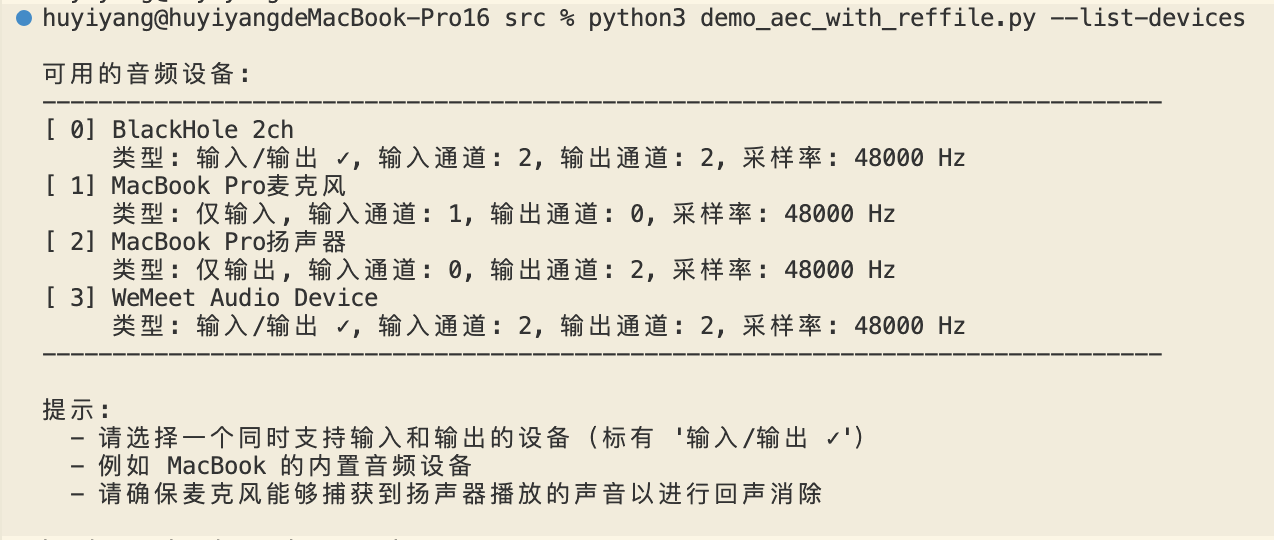
最简单的运行方式(使用系统默认设备):
python3 demo_aec_with_reffile.py --ref ref.wav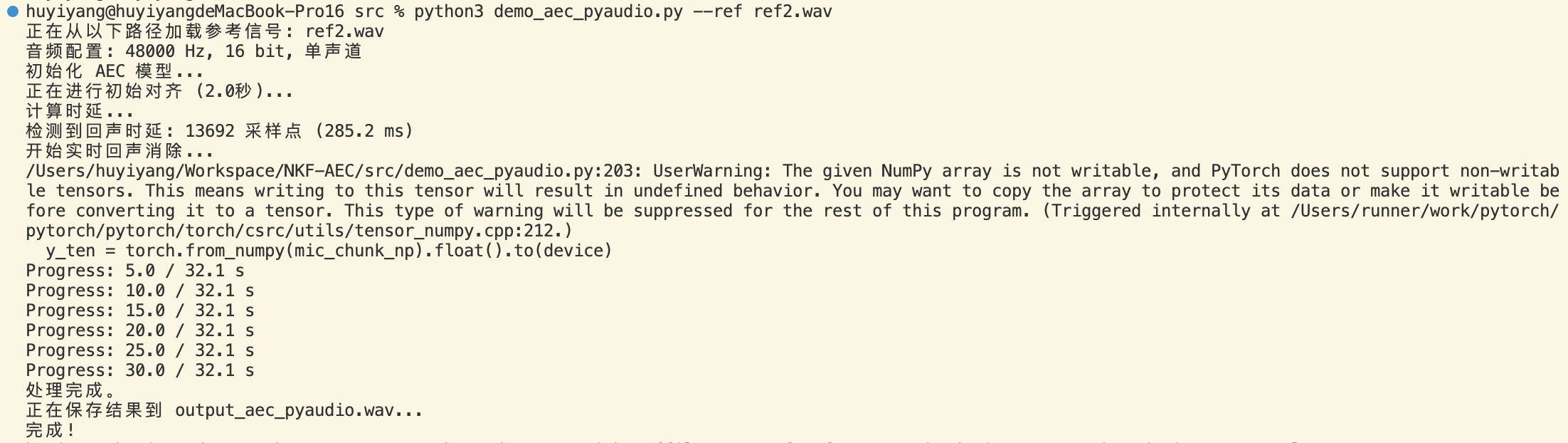
如果你需要指定特定的麦克风或扬声器,或者保存原始录音进行对比:
python3 demo_aec_with_reffile.py \
    --ref ref.wav \
    --mic-device 1 \
    --speaker-device 2 \
    --output output_aec.wav \
--raw-output output_raw.wav如果你已知系统的固定延迟(例如在固定的硬件上),可以通过 --fixed-delay 参数跳过自动对齐阶段:
python3 demo_aec_with_reffile.py --ref ref.wav --fixed-delay 1600为了保证实时性和稳定性,代码中做了很多细节处理。例如在获取参考块时的边界处理:
def get_ref_chunk(self, play_idx: int, delay: int) -> np.ndarray:
    ref_start = play_idx - delay
    # ... (处理 ref_start < 0 或超出音频长度的情况,进行补零)
    return self.ref_audio[ref_start:ref_end]
这种严谨的索引计算确保了模型始终能获取到正确时间窗口的参考信号,避免了因数组越界导致的程序崩溃或杂音。
demo_aec_with_reffile.py 是构建实时音频处理系统的一种实践:
通过阅读和运行该脚本,你可以快速上手 NKF-AEC,并将其集成到你自己的语音应用中。
#!/usr/bin/env python3
# -*- coding: utf-8 -*-
"""
实时回声消除 Demo - 使用参考音频文件

功能说明:
1. 播放参考音频文件(如 ref.wav)到扬声器
2. 同时从麦克风录制声音(包含回声)
3. 启动时进行声音对齐,计算系统延迟
4. 准实时输出回声消除后的音频块
5. 程序终止时保存处理后的音频

依赖: pip3 install pyaudio torch numpy soundfile scipy

用法:
    python3 demo_aec_with_reffile.py --list-devices
    python3 demo_aec_with_reffile.py --ref ref.wav --output output_aec.wav
    python3 demo_aec_with_reffile.py --ref ref.wav --mic-device 1 --speaker-device 2

改进说明(v2):
    - 使用单流同步阻塞式读写(同时 input=True, output=True)
    - 直接使用播放索引计算参考信号位置,消除时间对齐误差
    - 对齐阶段与实时处理阶段使用相同的流配置
    - 支持分别指定麦克风和扬声器设备,或使用系统默认设备
"""

import torch
import pyaudio
import numpy as np
import soundfile as sf
import argparse
import signal
import time
import os
import sys
from typing import Optional, Callable

from nkf import NKF
from nkf_streaming import NKFStreaming
from utils import gcc_phat


class RealtimeAECWithRefFile:
    """
    使用参考音频文件进行实时回声消除

    工作流程:
    1. 播放参考音频文件到扬声器
    2. 从麦克风录制音频(包含回声)
    3. 使用NKF模型实时消除回声

    改进版:使用单流同步阻塞式读写,提高时间对齐精度
    """

    def __init__(
        self,
        model_path: str,
        ref_audio_path: str,
        mic_device_idx: Optional[int] = None,
        speaker_device_idx: Optional[int] = None,
        sample_rate: int = 16000,
        hop_size: int = 256,
        block_size: int = 1024,
        align_duration: float = 2.0,
        output_path: str = 'output_aec.wav',
        raw_output_path: Optional[str] = None,
        on_output_chunk: Optional[Callable[[np.ndarray], None]] = None,
        fixed_delay: Optional[int] = None
    ):
        """
        初始化实时AEC处理器

        Args:
            model_path: NKF模型权重文件路径
            ref_audio_path: 参考音频文件路径(将被播放到扬声器)
            mic_device_idx: 麦克风设备索引,None表示使用系统默认输入设备
            speaker_device_idx: 扬声器设备索引,None表示使用系统默认输出设备
            sample_rate: 采样率
            hop_size: 每次处理的样本数
            block_size: STFT窗口大小
            align_duration: 对齐阶段时长(秒)
            output_path: 输出wav文件路径
            raw_output_path: 原始麦克风录音输出路径(未经AEC处理),None表示不保存
            on_output_chunk: 可选的回调函数,每次处理完一个音频块后调用
            fixed_delay: 固定延迟值(采样点),如果指定则跳过自动对齐
        """
        self.sample_rate = sample_rate
        self.hop_size = hop_size
        self.block_size = block_size
        self.mic_device_idx = mic_device_idx
        self.speaker_device_idx = speaker_device_idx
        self.align_duration = align_duration
        self.output_path = output_path
        self.raw_output_path = raw_output_path
        self.on_output_chunk = on_output_chunk
        self.fixed_delay = fixed_delay

        # 状态标志
        self.running = False
        self.delay_samples = 0

        # 输出缓冲
        self.output_buffer = []
        self.raw_output_buffer = []  # 保存原始麦克风录音(未经AEC处理)

        # 初始化PyAudio
        self.pa = pyaudio.PyAudio()

        # 加载参考音频
        print(f"正在加载参考音频: {ref_audio_path}")
        self._load_ref_audio(ref_audio_path)

        # 加载模型
        print("正在加载NKF模型...")
        self._load_model(model_path)

        print(f"初始化完成。采样率: {sample_rate} Hz, Hop: {hop_size}, Block: {block_size}")
        print(f"参考音频时长: {len(self.ref_audio) / sample_rate:.2f} 秒")

    def _load_ref_audio(self, ref_audio_path: str):
        """加载并预处理参考音频"""
        if not os.path.exists(ref_audio_path):
            raise FileNotFoundError(f"参考音频文件未找到: {ref_audio_path}")

        audio, sr = sf.read(ref_audio_path, dtype='float32')

        # 如果是多声道,转换为单声道
        if audio.ndim > 1:
            audio = audio.mean(axis=1)

        # 如果采样率不匹配,进行重采样
        if sr != self.sample_rate:
            print(f"重采样: {sr} Hz -> {self.sample_rate} Hz")
            from scipy import signal as scipy_signal
            num_samples = int(len(audio) * self.sample_rate / sr)
            audio = scipy_signal.resample(audio, num_samples).astype(np.float32)

        self.ref_audio = audio.astype(np.float32)

    def _load_model(self, model_path: str):
        """加载NKF模型"""
        self.device = torch.device('cpu')
        self.model = NKF(L=4)

        # 处理模型路径
        if not os.path.isabs(model_path) and not os.path.exists(model_path):
            script_dir = os.path.dirname(os.path.abspath(__file__))
            model_path_in_script_dir = os.path.join(script_dir, model_path)
            if os.path.exists(model_path_in_script_dir):
                model_path = model_path_in_script_dir

        if not os.path.exists(model_path):
            raise FileNotFoundError(f"模型文件未找到: {model_path}")

        self.model.load_state_dict(torch.load(model_path, map_location=self.device), strict=True)
        self.model.to(self.device)
        self.model.eval()

        # 初始化流式处理器
        self.aec_stream = NKFStreaming(self.model, block_size=self.block_size, hop_size=self.hop_size)
        self.aec_stream.to(self.device)

    def _open_stream(self) -> pyaudio.Stream:
        """
        打开单个音频流,同时支持输入和输出
        使用同步阻塞式读写,保证时间对齐精度

        当 mic_device_idx 或 speaker_device_idx 为 None 时,使用系统默认设备
        """
        # 构建打开流的参数
        stream_kwargs = {
            'format': pyaudio.paFloat32,
            'channels': 1,
            'rate': self.sample_rate,
            'input': True,
            'output': True,
            'frames_per_buffer': self.hop_size
        }

        # 只有在明确指定设备时才添加设备索引
        if self.mic_device_idx is not None:
            stream_kwargs['input_device_index'] = self.mic_device_idx
        if self.speaker_device_idx is not None:
            stream_kwargs['output_device_index'] = self.speaker_device_idx

        stream = self.pa.open(**stream_kwargs)
        return stream

    def align_signals(self, stream: pyaudio.Stream) -> int:
        """
        对齐阶段:采集一段音频计算扬声器播放和麦克风录制之间的延迟
        使用与实时处理相同的流配置

        Args:
            stream: 已打开的音频流

        Returns:
            检测到的延迟(采样点数)
        """
        print(f"开始对齐阶段 ({self.align_duration}秒)...")
        print("请确保扬声器有足够音量,让麦克风能够捕获到回声...")

        align_samples = int(self.align_duration * self.sample_rate)
        n_chunks = align_samples // self.hop_size

        rec_frames = []

        # 使用同步的播放和录制
        for i in range(n_chunks):
            # 播放参考音频
            out_chunk = self.ref_audio[i * self.hop_size : (i + 1) * self.hop_size]
            if len(out_chunk) < self.hop_size:
                out_chunk = np.pad(out_chunk, (0, self.hop_size - len(out_chunk)))
            stream.write(out_chunk.tobytes())

            # 录制麦克风
            in_data = stream.read(self.hop_size)
            rec_frames.append(in_data)

        # 合并录音数据
        rec_sig = np.frombuffer(b''.join(rec_frames), dtype=np.float32)
        ref_sig = self.ref_audio[:len(rec_sig)]

        # 检查信号是否有效
        if np.abs(rec_sig).mean() < 1e-6:
            print("警告: 麦克风信号几乎为静音,无法计算延迟。")
            print("       请确保麦克风正常工作且能够捕获到扬声器声音。")
            return 0

        if np.abs(ref_sig).mean() < 1e-6:
            print("警告: 参考信号几乎为静音,无法计算延迟。")
            print("       请确保参考音频文件包含有效音频。")
            return 0

        # 使用GCC-PHAT计算延迟
        try:
            tau = gcc_phat(rec_sig, ref_sig, fs=self.sample_rate, interp=1)
            # tau是mic相对于ref的延迟(秒),正值表示mic落后于ref
            delay_samples = max(0, int((tau - 0.001) * self.sample_rate))
            print(f"检测到延迟: {delay_samples} 采样点 ({delay_samples/self.sample_rate*1000:.1f} ms)")
            return delay_samples
        except Exception as e:
            print(f"警告: 延迟计算失败: {e},使用默认延迟0")
            return 0

    def get_ref_chunk(self, play_idx: int, delay: int) -> np.ndarray:
        """
        获取对应的参考音频块(考虑延迟补偿)

        Args:
            play_idx: 当前播放位置
            delay: 延迟采样点数

        Returns:
            参考音频块
        """
        ref_start = play_idx - delay
        ref_end = ref_start + self.hop_size

        if ref_start < 0:
            if ref_end <= 0:
                return np.zeros(self.hop_size, dtype=np.float32)
            else:
                # 部分补零
                pad_len = -ref_start
                return np.concatenate([
                    np.zeros(pad_len, dtype=np.float32),
                    self.ref_audio[0:ref_end]
                ])
        else:
            if ref_end > len(self.ref_audio):
                # 末尾补零
                remain = len(self.ref_audio) - ref_start
                if remain <= 0:
                    return np.zeros(self.hop_size, dtype=np.float32)
                return np.concatenate([
                    self.ref_audio[ref_start:],
                    np.zeros(self.hop_size - remain, dtype=np.float32)
                ])
            else:
                return self.ref_audio[ref_start:ref_end].copy()

    def process_chunk(self, mic_chunk: np.ndarray, ref_chunk: np.ndarray) -> np.ndarray:
        """
        处理一个音频块

        Args:
            mic_chunk: 麦克风输入 (numpy array, hop_size)
            ref_chunk: 参考信号 (numpy array, hop_size)

        Returns:
            回声消除后的音频块 (numpy array, hop_size)
        """
        # 转换为tensor
        x_tensor = torch.from_numpy(ref_chunk).float().to(self.device)
        y_tensor = torch.from_numpy(mic_chunk).float().to(self.device)

        # 调用NKF流式处理
        with torch.no_grad():
            output_tensor = self.aec_stream.process_chunk(x_tensor, y_tensor)

        return output_tensor.cpu().numpy()

    def run(self):
        """主处理循环"""
        self.running = True

        # 打印设备信息
        if self.mic_device_idx is None and self.speaker_device_idx is None:
            print("启动音频流... 使用系统默认输入/输出设备")
        else:
            mic_info = f"麦克风设备: {self.mic_device_idx}" if self.mic_device_idx is not None else "麦克风: 系统默认"
            spk_info = f"扬声器设备: {self.speaker_device_idx}" if self.speaker_device_idx is not None else "扬声器: 系统默认"
            print(f"启动音频流... {mic_info}, {spk_info}")

        # 打开单个同步流
        stream = self._open_stream()

        # 对齐阶段
        if self.fixed_delay is not None:
            # 使用固定延迟值,跳过自动对齐
            self.delay_samples = self.fixed_delay
            align_end_idx = 0
            print(f"使用固定延迟值: {self.delay_samples} 采样点 ({self.delay_samples/self.sample_rate*1000:.1f} ms)")
        elif self.align_duration > 0:
            self.delay_samples = self.align_signals(stream)
            align_end_idx = int(self.align_duration * self.sample_rate)

            # 关闭并重新打开流,重置模型状态
            stream.stop_stream()
            stream.close()

            # 重新初始化流式处理器(清除对齐阶段的状态)
            self.aec_stream = NKFStreaming(self.model, block_size=self.block_size, hop_size=self.hop_size)
            self.aec_stream.to(self.device)

            stream = self._open_stream()
            print("对齐完成,开始实时回声消除处理...\n")
        else:
            print("跳过对齐阶段(align_duration=0),使用默认延迟0")
            self.delay_samples = 0
            align_end_idx = 0

        print("按 Ctrl+C 停止并保存输出文件\n")

        # 从对齐结束位置继续播放
        play_idx = align_end_idx
        total_samples = len(self.ref_audio)

        processed_chunks = 0
        start_time = time.time()

        try:
            with torch.no_grad():
                while self.running and play_idx < total_samples - self.hop_size:
                    # 1. 获取要播放的参考音频块
                    out_chunk = self.ref_audio[play_idx : play_idx + self.hop_size]
                    if len(out_chunk) < self.hop_size:
                        out_chunk = np.pad(out_chunk, (0, self.hop_size - len(out_chunk)))

                    # 2. 同步播放(阻塞式写入)
                    stream.write(out_chunk.tobytes())

                    # 3. 同步录制(阻塞式读取)
                    in_bytes = stream.read(self.hop_size)
                    mic_chunk = np.frombuffer(in_bytes, dtype=np.float32)

                    # 4. 获取对应的参考信号(考虑延迟补偿)
                    # 关键:ref_chunk = Ref[play_idx - delay]
                    ref_chunk = self.get_ref_chunk(play_idx, self.delay_samples)

                    # 5. 保存原始麦克风数据(用于对比)
                    if self.raw_output_path is not None:
                        self.raw_output_buffer.append(mic_chunk.copy())

                    # 6. AEC处理
                    output_chunk = self.process_chunk(mic_chunk, ref_chunk)

                    # 7. 调用回调函数(如果设置了)
                    if self.on_output_chunk is not None:
                        self.on_output_chunk(output_chunk)

                    # 8. 存储输出
                    self.output_buffer.append(output_chunk)

                    # 更新位置
                    play_idx += self.hop_size
                    processed_chunks += 1

                    # 每5秒打印一次进度
                    if processed_chunks % (self.sample_rate // self.hop_size * 5) == 0:
                        elapsed = time.time() - start_time
                        processed_sec = processed_chunks * self.hop_size / self.sample_rate
                        progress = play_idx / total_samples * 100
                        print(f"已处理: {processed_sec:.1f}s, 实际耗时: {elapsed:.1f}s, "
                              f"进度: {progress:.1f}%")

        except KeyboardInterrupt:
            print("\n收到停止信号...")

        # 播放完成
        if play_idx >= total_samples - self.hop_size:
            print("\n参考音频播放完成!")

        # 停止并关闭流
        stream.stop_stream()
        stream.close()

        self.stop()

    def stop(self):
        """停止处理并保存结果"""
        self.running = False
        self.pa.terminate()

        # 保存输出
        if len(self.output_buffer) > 0:
            print(f"\n正在保存AEC处理后的结果到 {self.output_path}...")
            output_signal = np.concatenate(self.output_buffer)
            sf.write(self.output_path, output_signal, self.sample_rate)
            print(f"保存完成! 总时长: {len(output_signal)/self.sample_rate:.2f}秒")
        else:
            print("没有处理任何音频数据")

        # 保存原始麦克风录音(未经AEC处理)
        if self.raw_output_path is not None and len(self.raw_output_buffer) > 0:
            print(f"正在保存原始麦克风录音到 {self.raw_output_path}...")
            raw_signal = np.concatenate(self.raw_output_buffer)
            sf.write(self.raw_output_path, raw_signal, self.sample_rate)
            print(f"原始录音保存完成! 总时长: {len(raw_signal)/self.sample_rate:.2f}秒")

    def get_output_buffer(self) -> np.ndarray:
        """获取当前所有输出数据"""
        if len(self.output_buffer) > 0:
            return np.concatenate(self.output_buffer)
        return np.array([], dtype=np.float32)


def list_audio_devices():
    """列出所有可用的音频设备"""
    pa = pyaudio.PyAudio()
    print("\n可用的音频设备:")
    print("-" * 80)

    for i in range(pa.get_device_count()):
        dev_info = pa.get_device_info_by_index(i)

        # 判断设备类型
        input_ch = dev_info['maxInputChannels']
        output_ch = dev_info['maxOutputChannels']

        if input_ch > 0 and output_ch > 0:
            dev_type = "输入/输出"
        elif input_ch > 0:
            dev_type = "输入"
        elif output_ch > 0:
            dev_type = "输出"
        else:
            dev_type = "未知"

        print(f"[{i:2d}] {dev_info['name']}")
        print(f"     类型: {dev_type}, 输入通道: {input_ch}, 输出通道: {output_ch}, "
              f"采样率: {int(dev_info['defaultSampleRate'])} Hz")

    print("-" * 80)
    print("\n提示:")
    print("  - 不指定设备时,程序将使用系统默认的输入/输出设备")
    print("  - 可以用 --mic-device 和 --speaker-device 分别指定麦克风和扬声器")
    print("  - 请确保麦克风能够捕获到扬声器播放的声音以进行回声消除\n")

    pa.terminate()


def main():
    parser = argparse.ArgumentParser(
        description="实时回声消除 Demo - 使用参考音频文件(改进版v2)",
        formatter_class=argparse.RawDescriptionHelpFormatter,
        epilog="""
示例:
  # 列出所有音频设备
  python3 demo_aec_with_reffile.py --list-devices

  # 运行实时AEC(使用系统默认输入/输出设备)
  python3 demo_aec_with_reffile.py --ref ref.wav

  # 指定麦克风和扬声器设备
  python3 demo_aec_with_reffile.py --ref ref.wav --mic-device 1 --speaker-device 2

  # 使用自定义采样率和输出路径
  python3 demo_aec_with_reffile.py --ref ref.wav --sample-rate 16000 --output my_output.wav

  # 同时保存原始麦克风录音(用于对比AEC效果)
  python3 demo_aec_with_reffile.py --ref ref.wav --output output_aec.wav --raw-output output_raw.wav

  # 使用固定延迟值(跳过自动对齐)
  python3 demo_aec_with_reffile.py --ref ref.wav --fixed-delay 1600

工作流程:
  1. 程序会播放指定的参考音频文件到扬声器
  2. 同时从麦克风录制声音(包含扬声器播放的回声)
  3. 启动时进行 2 秒的声音对齐,计算系统延迟
  4. 之后进行准实时的回声消除处理
  5. 参考音频播放完毕或按 Ctrl+C 时,保存处理结果

改进说明 (v2):
  - 使用单流同步阻塞式读写,提高时间对齐精度
  - 直接使用播放索引计算参考信号位置
  - 对齐阶段与实时处理阶段使用相同的流配置
  - 支持分别指定麦克风和扬声器设备,或使用系统默认设备

注意:
  1. 不指定设备时使用系统默认的输入/输出设备(推荐)
  2. 请确保麦克风能够捕获到扬声器播放的声音
  3. 启动时请保持安静,让对齐阶段能准确计算延迟
        """
    )

    parser.add_argument('--list-devices', action='store_true',
                        help='列出所有可用的音频设备')
    parser.add_argument('--ref', type=str, default='ref.wav',
                        help='参考音频文件路径(将被播放到扬声器)')
    parser.add_argument('--mic-device', type=int, default=None,
                        help='麦克风设备索引(不指定则使用系统默认输入设备)')
    parser.add_argument('--speaker-device', type=int, default=None,
                        help='扬声器设备索引(不指定则使用系统默认输出设备)')
    parser.add_argument('--model', type=str, default='nkf_epoch70.pt',
                        help='NKF模型权重文件路径')
    parser.add_argument('--output', type=str, default='output_aec.wav',
                        help='AEC处理后的输出wav文件路径')
    parser.add_argument('--raw-output', type=str, default=None,
                        help='原始麦克风录音输出wav文件路径(未经AEC处理,用于对比)')
    parser.add_argument('--sample-rate', type=int, default=16000,
                        help='采样率 (默认: 16000)')
    parser.add_argument('--align-duration', type=float, default=2.0,
                        help='对齐阶段时长,单位秒 (默认: 2.0)')
    parser.add_argument('--hop-size', type=int, default=256,
                        help='每次处理的样本数 (默认: 256)')
    parser.add_argument('--block-size', type=int, default=1024,
                        help='STFT窗口大小 (默认: 1024)')
    parser.add_argument('--fixed-delay', type=int, default=None,
                        help='使用固定延迟值(采样点),跳过自动对齐')

    args = parser.parse_args()

    if args.list_devices:
        list_audio_devices()
        return

    # 处理参考音频路径
    ref_path = args.ref
    if not os.path.isabs(ref_path) and not os.path.exists(ref_path):
        script_dir = os.path.dirname(os.path.abspath(__file__))
        ref_path_in_script_dir = os.path.join(script_dir, ref_path)
        if os.path.exists(ref_path_in_script_dir):
            ref_path = ref_path_in_script_dir

    # 定义输出回调(可选,用于准实时获取处理后的音频块)
    def on_output(chunk: np.ndarray):
        """每次处理完一个音频块后的回调"""
        # 这里可以添加自定义处理逻辑,例如:
        # - 实时播放处理后的音频
        # - 通过网络发送
        # - 进行后续处理
        pass  # 默认不做任何事情

    # 创建并运行AEC处理器
    aec = RealtimeAECWithRefFile(
        model_path=args.model,
        ref_audio_path=ref_path,
        mic_device_idx=args.mic_device,
        speaker_device_idx=args.speaker_device,
        sample_rate=args.sample_rate,
        hop_size=args.hop_size,
        block_size=args.block_size,
        align_duration=args.align_duration,
        output_path=args.output,
        raw_output_path=args.raw_output,
        on_output_chunk=on_output,  # 可以传入自定义回调
        fixed_delay=args.fixed_delay
    )

    # 设置信号处理
    def signal_handler(sig, frame):
        print("\n收到中断信号,正在停止...")
        aec.running = False

    signal.signal(signal.SIGINT, signal_handler)
    signal.signal(signal.SIGTERM, signal_handler)

    # 运行
    aec.run()


if __name__ == "__main__":
    main()


