

产品中心
本文描述问题及解决方法同样适用于 腾讯云 Elasticsearch Service(ES)。
最近在生产环境遇到了一个棘手的问题:创建ES快照时报错超时,错误信息如下:
[o.e.s.SnapshotsService   ] [xxxxxxx] [esBackup][xxx] failed to create snapshot
org.elasticsearch.cluster.metadata.ProcessClusterEventTimeoutException: failed to process cluster event (create_snapshot [xxx]) within 10m
	at org.elasticsearch.cluster.service.MasterService$Batcher.lambda$onTimeout$0(MasterService.java:131) [elasticsearch-6.8.2.jar:6.8.2]
	at java.util.ArrayList.forEach(ArrayList.java:1541) [?:?]
	at org.elasticsearch.cluster.service.MasterService$Batcher.lambda$onTimeout$1(MasterService.java:130) [elasticsearch-6.8.2.jar:6.8.2]
	at org.elasticsearch.common.util.concurrent.ThreadContext$ContextPreservingRunnable.run(ThreadContext.java:681) [elasticsearch-6.8.2.jar:6.8.2]
	at java.util.concurrent.ThreadPoolExecutor.runWorker(ThreadPoolExecutor.java:1128) [?:?]
	at java.util.concurrent.ThreadPoolExecutor$Worker.run(ThreadPoolExecutor.java:628) [?:?]
at java.lang.Thread.run(Thread.java:834) [?:?]这个错误提示集群事件处理超时了,10 分钟都没处理完。一般来说,快照创建不应该这么慢,肯定是哪里出了问题。
我先查看了 _cat/thread_pool 接口,发现有个节点的 snapshot 线程池一直被占用,有个任务一直不释放。

这就很可疑了,于是登上这个节点打了个 jstack,看看这个线程到底在干什么。
堆栈信息:
"elasticsearch[xxx][snapshot][T#1]" #117 daemon prio=5 os_prio=0 cpu=417459.58ms elapsed=173245.48s
java.lang.Thread.State: RUNNABLE
at java.net.SocketInputStream.socketRead0(Native Method)
at java.net.SocketInputStream.socketRead(SocketInputStream.java:115)
...
at com.qcloud.cos.COSClient.deleteObject(COSClient.java:1297)
at org.elasticsearch.repositories.cos.COSBlobContainer.deleteBlobIgnoringIfNotExists(COSBlobContainer.java:191)
at org.elasticsearch.repositories.blobstore.BlobStoreRepository$Context.finalize(BlobStoreRepository.java:1049)
at org.elasticsearch.repositories.blobstore.BlobStoreRepository$Context.delete(BlobStoreRepository.java:979)
at org.elasticsearch.repositories.blobstore.BlobStoreRepository.delete(BlobStoreRepository.java:917)
at org.elasticsearch.repositories.blobstore.BlobStoreRepository.deleteSnapshot(BlobStoreRepository.java:448)
at org.elasticsearch.snapshots.SnapshotsService.deleteSnapshotFromRepository(SnapshotsService.java:1314)看到这个堆栈,问题就清楚了:这个线程正在删除快照,而且卡在了删除 COS(腾讯云对象存储)对象的操作上。从 elapsed=173245.48s 可以看出,这个线程已经运行了 48 个小时!
为什么删除快照会阻塞创建快照?
要理解这个问题,我们需要先看看 Elasticsearch 的快照机制。我们看一下流程图:
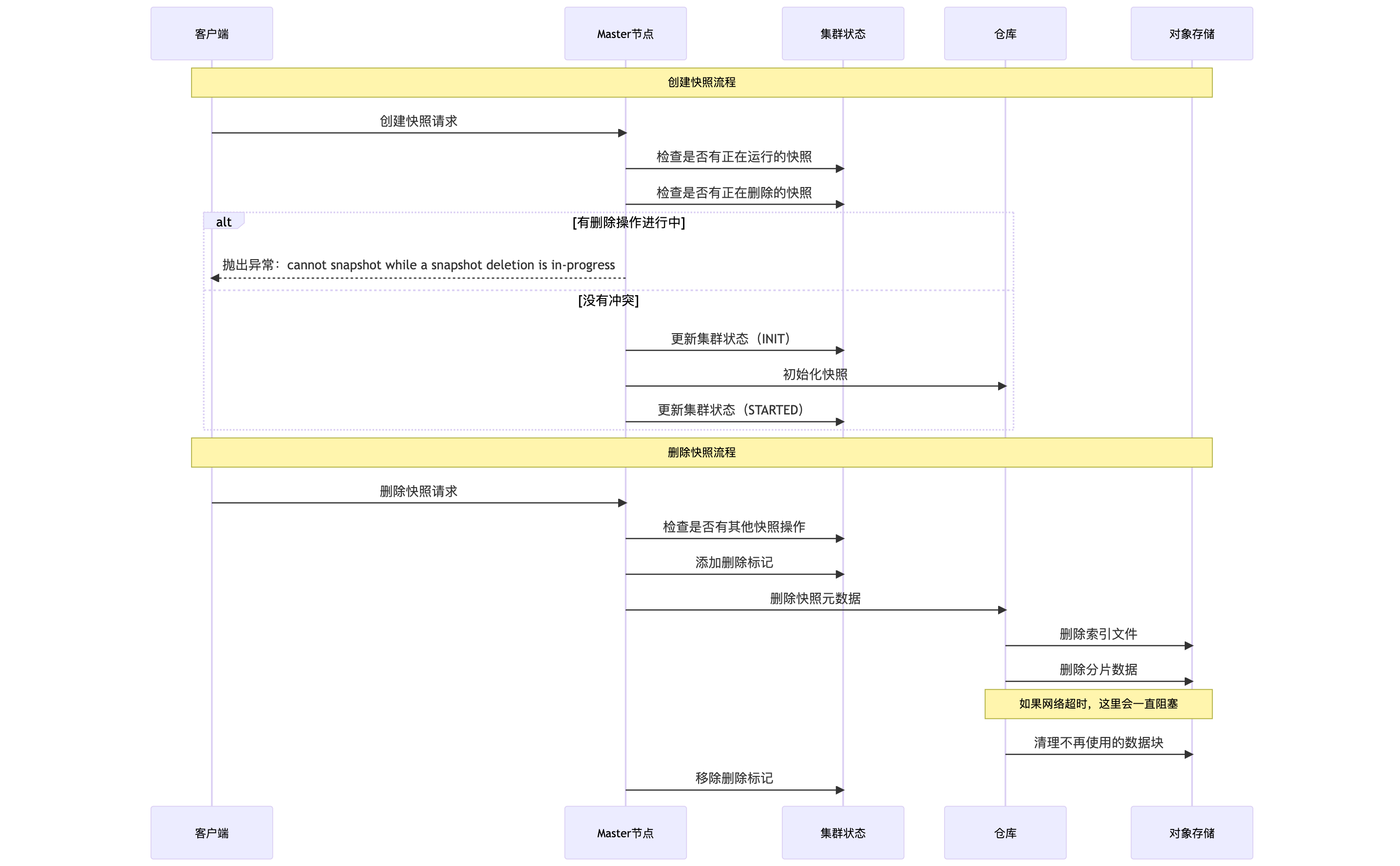
从代码来看,在 SnapshotsService.java:1314 的 deleteSnapshotFromRepository 方法中,删除操作是在 snapshot 线程池中执行的:
private void deleteSnapshotFromRepository(Snapshot snapshot, @Nullable ActionListener<Void> listener, long repositoryStateId) {
    threadPool.executor(ThreadPool.Names.SNAPSHOT).execute(() -> {
        try {
            Repository repository = repositoriesService.repository(snapshot.getRepository());
            repository.deleteSnapshot(snapshot.getSnapshotId(), repositoryStateId);
            logger.info("snapshot [{}] deleted", snapshot);
            removeSnapshotDeletionFromClusterState(snapshot, null, listener);
        } catch (Exception ex) {
            removeSnapshotDeletionFromClusterState(snapshot, ex, listener);
        }
    });
}而在创建快照时,代码会检查是否有删除操作正在进行(SnapshotsService.java:280):
SnapshotDeletionsInProgress deletionsInProgress = currentState.custom(SnapshotDeletionsInProgress.TYPE);
if (deletionsInProgress != null && deletionsInProgress.hasDeletionsInProgress()) {
    throw new ConcurrentSnapshotExecutionException(repositoryName, snapshotName,
        "cannot snapshot while a snapshot deletion is in-progress");
}
这就是问题的根源:删除操作占用了 snapshot 线程池,并且因为网络问题一直阻塞,导致新的快照创建请求无法进行。
让我们深入看看 BlobStoreRepository.java:404 的 deleteSnapshot 方法:
public void deleteSnapshot(SnapshotId snapshotId, long repositoryStateId) {
    // 1. 从索引文件中删除快照记录
    final RepositoryData updatedRepositoryData = repositoryData.removeSnapshot(snapshotId);
    writeIndexGen(updatedRepositoryData, repositoryStateId);

    // 2. 删除快照元数据文件
    deleteSnapshotBlobIgnoringErrors(snapshot, snapshotId.getUUID());
    deleteGlobalMetaDataBlobIgnoringErrors(snapshot, snapshotId.getUUID());

    // 3. 删除所有索引的数据
    if (snapshot != null) {
        final List<String> indices = snapshot.indices();
        for (String index : indices) {
            // 删除索引元数据
            deleteIndexMetaDataBlobIgnoringErrors(snapshot, indexId);

            // 删除每个分片的数据
            if (indexMetaData != null) {
                for (int shardId = 0; shardId < indexMetaData.getNumberOfShards(); shardId++) {
                    delete(snapshotId, indexId, new ShardId(indexMetaData.getIndex(), shardId));
                }
            }
        }
    }

    // 4. 清理不再被任何快照引用的索引目录
    for (final IndexId indexId : indicesToCleanUp) {
        indicesBlobContainer.deleteBlobIgnoringIfNotExists(indexId.getId());
    }
}而在删除分片数据时,会调用 Context.delete() 方法,最终调用 finalize() 方法(BlobStoreRepository.java:1049):
protected void finalize(final List<SnapshotFiles> snapshots,
                        final int fileListGeneration,
                        final Map<String, BlobMetaData> blobs,
                        final String reason) {
    // 删除临时文件
    for (final String blobName : blobs.keySet()) {
        if (FsBlobContainer.isTempBlobName(blobName)) {
            blobContainer.deleteBlobIgnoringIfNotExists(blobName);
        }
    }

    // 删除旧的索引文件
    for (final String blobName : blobs.keySet()) {
        if (blobName.startsWith(SNAPSHOT_INDEX_PREFIX)) {
            blobContainer.deleteBlobIgnoringIfNotExists(blobName);
        }
    }

    // 删除不再被任何快照引用的数据块
    for (final String blobName : blobs.keySet()) {
        if (blobName.startsWith(DATA_BLOB_PREFIX) &&
            (updatedSnapshots.findNameFile(canonicalName(blobName)) == null)) {
            blobContainer.deleteBlobIgnoringIfNotExists(blobName);  // 这里卡住了!
        }
    }
}问题就出在这里:在清理不再使用的数据块时,需要逐个调用 COS 的 deleteObject 接口。如果快照很大,可能有成千上万个数据块需要删除。而从 jstack 看,线程卡在了 socketRead 上,说明网络请求一直没有返回。
正常情况下,HTTP 请求应该有超时设置,不应该等待 48 小时。但从堆栈来看,线程卡在了 SSL socket 的读取操作上:
at java.net.SocketInputStream.socketRead0(Native Method)
at sun.security.ssl.SSLSocketInputRecord.read(SSLSocketInputRecord.java:476)
这是一个阻塞式的 socket 读取操作。如果:
COS 服务端没有正确关闭连接
中间网络设备(如防火墙、负载均衡器)没有正确处理超时
TCP keepalive 没有生效
那么这个线程就会一直阻塞下去,直到:
对端主动关闭连接
操作系统层面的 TCP 超时(通常是几个小时)
进程被杀死
针对这个问题,我的解决方案是:重启节点。最直接的方法是重启卡住的节点,释放被占用的线程。虽然治标不治本,但可以快速解决问题,长期方案则是需要考虑优化ES快照的删除逻辑或者使用独立的删除线程池。
希望这次排查经验能帮助大家在遇到类似问题时快速定位和解决。记住,jstack 是排查定位问题的好朋友,当服务出现莫名其妙的阻塞时,打个线程堆栈往往能一眼看出问题所在。


